
Free Tools for Content Creators: A Complete Work Kit With Zero Subscriptions
One of the biggest barriers new content creators see in front of them is the impression that serious work requires an expensive paid kit — subscriptions accumulate before the first article is published, and the investment itself becomes a burden accelerating surrender. The truth I have experienced across years of work is that the entire starting phase can be covered by strong free tools, and paid upgrades become justified later when your work grows and shows a real, demonstrated need.
In this article I arrange a complete work kit covering the content journey from idea to measurement, with tools I actually use, and with every tool an explicit note on its free-version limits so you are not surprised mid-work. I wrote this review after rebuilding my own kit more than once, deleting far more tools than I kept, so treat it as a filtered starting point rather than a raw directory of links.
What you will actually do after reading this article:
- Build a free kit covering writing, images, SEO, measurement, and organization
- Know each tool's free limits before depending on it in your workflow
- Arrange tools by work stage instead of hoarding them without intent
- Avoid the trap of collecting tools instead of producing content
My Criteria Before Making Any List
My first criterion is a tool solving a real problem you face today, not one you "might need someday" — collections full of unused tools create mental noise that slows work instead of speeding it. The second criterion: a stable tool with a non-annoying interface, because a tool you use ten times daily must not suffer lag or obnoxious ads on every click. The third I never compromise on: the free limit must be visible from the start — some services announce "free" then block saving behind a subscription after ten minutes of your work.
Before entering the list, watch out for a whole category of tools you do not need at your stage: post schedulers across ten platforms, full team organizers for one person, and complex automation platforms connecting services you never use. These tools are marketed to creators with an aura of professionalism, but a small site at a steady pace manages everything with far simpler, stabler tools. Beware of suspended professionalism floating over nonexistent real work — it is the most beautiful form of procrastination and the most expensive in time.
The idea is to let every tool enter your life on request from actual work, not from an ad — and this same pattern applies to every section in this article. Each section below also names the exact task the tool performs, so you can test my choices against your own weekly task list before adopting any of them, which is precisely how a personal kit should be assembled.
I add a criterion specific to us content creators: the tool must not hold your data hostage in a closed format you cannot export. A good tool lets you take your files and texts and leave whenever you wish, because attachment to a vague lock is the most expensive implicit subscription you can pay. Every tool in the following list passed these criteria in my actual use, and I noted a similar alternative where your needs may differ.
The Idea and Research Stage: Where Topics Come From
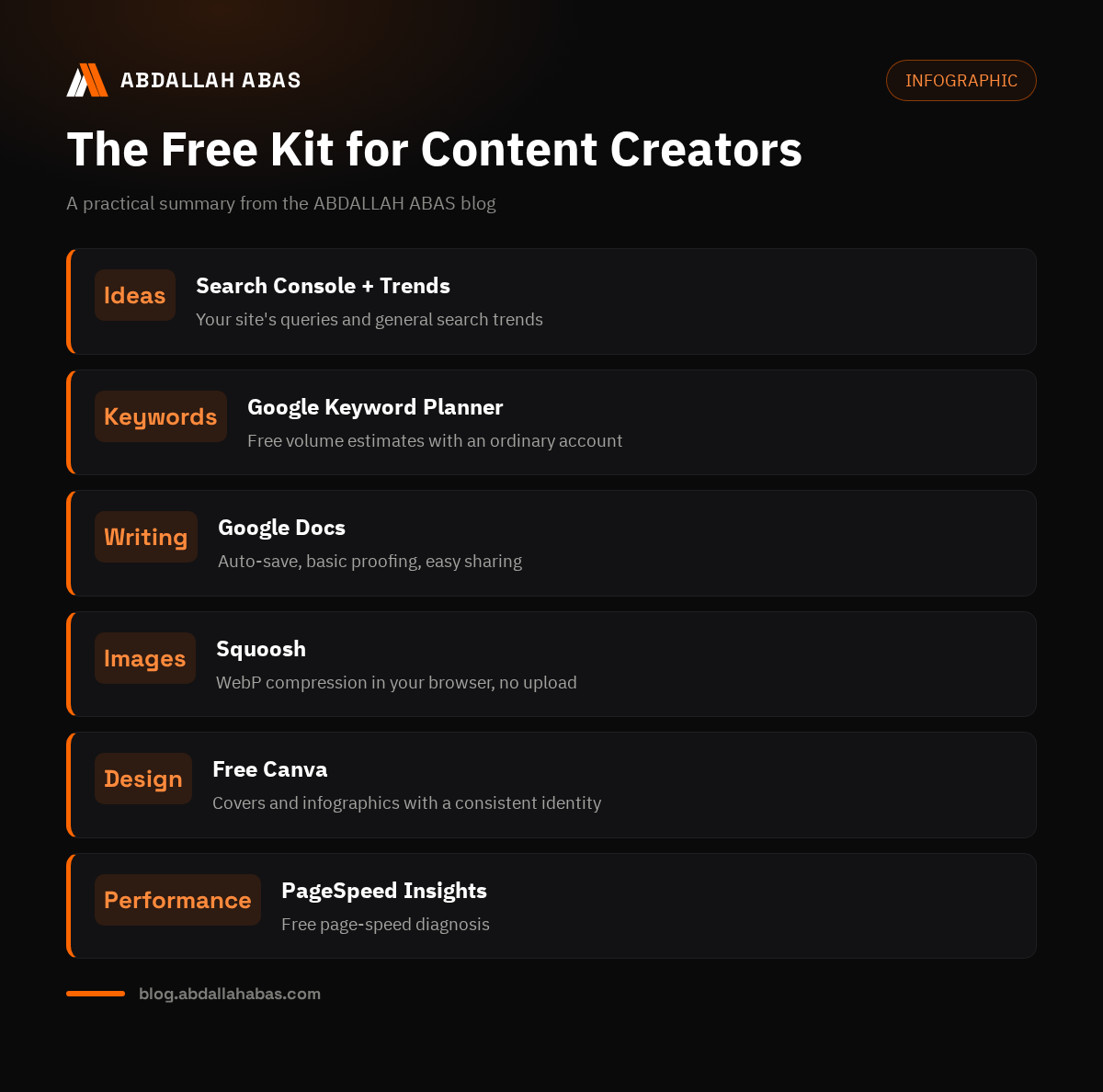
Start with the two strongest free tools of this stage: Search Console for your own site, where performance reports turn into ready idea lists from queries your site ranks late for — the most honest ideas possible, being audience demand documented with numbers. And Google Trends for reading general search trends and comparing terms against each other; it is completely free, needs no account, and helps you decide which wording people actually use.
For keyword research specifically, Google's Keyword Planner gives approximate monthly search volumes for free with an ordinary ads account, no active campaign needed — a perfectly acceptable starting substitute before any paid tool. Add Google's search suggestions and the "people also ask" boxes: always free, and they give you the audience's actual language. I detailed the keyword selection methodology step by step in the keyword research article — a tool without a method collects numbers, not decisions.
The Writing Stage: Workspace and Drafting
The strongest free writing workspace is Google Docs: automatic saving that never loses a paragraph, comments managing your revision notes, and clean publishing without broken formatting on transfer. Write your full draft there, run its built-in spell check, then move it to your blog in final order. For counting and measuring, a simple browser word counter is enough to follow your length target — you need no paid tool to know your article reached two thousand words.
Arabic spell checking is honestly the weakest link among free tools — the best working option today is the one built into Google Docs for obvious errors, with a final manual review nobody should skip. My working rule: make automated checking a first step, never a final verdict; let the article cool for an hour, then read it aloud quietly — hamza and taa-marbuta errors surface more by hearing than by seeing. This simple routine with no tool improves your texts' integrity more than a paid subscription whose output you never read.
The Images Stage: Design, Compression, Screenshots
For designing article covers and infographics, Canva's free version is fully sufficient for your stage: ready templates, a wide visual library, and export at the dimensions you want. Just beware elements marked as paid, and keep your blog's identity constant: two colors, one font, one reused template — visual consistency builds your brand faster than random variety per article. And set a time limit for design: a cover taking two hours is procrastination justified by aesthetics.
Image compression before upload is non-negotiable, and the best free tool here is Squoosh from Google: it runs in your browser with no account, converts your images to WebP at visual quality you choose yourself, and never uploads your image to any server because processing happens on your device. For experiment and tutorial screenshots, system tools suffice — add shading and an arrow or circle before publishing, because an annotated screenshot is the strongest proof you tried what you write about.
The SEO and Technical Check Stage
For SEO, replace nothing with Search Console — Google's official data on your indexing and performance, free forever; any paid tool in this area builds estimates on approximate data. Add a free browser extension showing search volume while you browse results — it shortens the open-search-return loop into reading a small number above results, enough for monthly planning without a subscription.
For checking page speed, PageSpeed Insights is the correct starting point, and I explained reading it and interpreting its three metrics in detail in the Core Web Vitals article. For deeper depth, the free WebPageTest service checks your site from multiple geographic locations and devices, showing your page's full loading sequence. These three together cover performance diagnosis from the simple to the professional level, all free at their core.
| Stage | Tool | What it offers free | Important free limit |
|---|---|---|---|
| Ideas & SEO | Search Console | Official indexing and performance data | None — always free |
| Ideas | Google Trends | Trends and term comparison | None, no account |
| Writing | Google Docs | Workspace and basic proofing | 15GB storage |
| Images | Squoosh | In-browser WebP compression | None |
| Design | Canva | Templates, elements, export | Some paid elements in library |
| Performance | PageSpeed Insights | Speed metrics and diagnostics | None |
The Organization Stage: Where You Record and Track
Organization needs no paid platform at your stage — a Google Sheets table with seven simple columns performs like full content management systems: article, type, primary keyword, status, publish date, link, measurement notes. This sheet becomes your decision archive and growth measure over time; I built every content plan I explained in the monthly plan article on this same logic. The idea that productivity requires a paid tool is among marketing's prettiest lies — discipline with a free sheet beats chaos with a luxurious system.
For reminders and recurring tasks like link checking or refreshing an old article, any notes app on your phone suffices — what matters is a defined appointment for the task, not interface beauty. Choose one place per record type and stick to it: scattering your records across five tools is the fastest road to losing information gathered with difficulty, and consolidating in one place gives you an honest picture of your work, not clashing pictures.
Building Your Own Kit Instead of Collecting Tools
The difference between a work kit and a digital pet collection of tools is actual use — the right kit has one tool per recurring task in your workflow, written in a document defining when to use each. Do it practically: list your real weekly tasks, walk through them step by step, and assign one chosen tool to each task, then stop searching. The monthly kit review adds a tool only when a new recurring task appears, and deletes a tool unopened for two months — a kit growing without pruning returns to being a burden.
And remember the most expensive thing in your work is not the tool's price but your time: a tool saving five minutes daily outweighs a monthly subscription saving nothing because you never integrated it into your routine. Measure every new tool by its real time: try it a week in actual work, and if it does not stick to your workflow, delete it without grief — this continuous mercy-killing keeps your kit alive and effective instead of turning into a museum of experiments.
The Audience Stage: Email and Free Lists
An email list from day one is a digital asset you will not appreciate until your site stabilizes in search, and the best free starting tools are email platforms offering free accounts for hundreds of subscribers with sufficient monthly sending limits. Start with one clear subscription form on your blog, and send a monthly message summarizing your best published work with a small addition not in the article — this tangible extra value is what prevents unsubscribes over time. Most content plans forget email because it grows slowly, but it proves to be your channel that nobody else owns when a search algorithm or platform changes.
Respect the free limit in email tools — it suffices for thousands of monthly messages at your stage, and exceeding it means your growth succeeded and moving to a paid plan is a happy decision, not a burden. Never hand your audience lists to any tool without a full open-format export option: this data is your direct property, and any platform holding it hostage is not a tool but a restraint. Check the export option before the list grows — a late migration from a lock-in platform is hundreds of times heavier than an early one.
Backup: The Tool Nobody Thinks of Until They Need It
Losing months of work to human error or wrong deletion is a lesson nobody learns before living it, so reserve a simple backup of your whole archive: content files in your code repository, article images in free cloud space, and a full monthly copy in a place separate from daily work. Our static sites benefit from the GitHub repository itself as a complete versioned record with dates — itself a backup level other platforms charge serious money for.
Write the backup routine into your monthly table as a non-deferrable step: ten full minutes preserve a year of work, and the difference between having a backup and not shows on one bad day only. Test restoring your backup once every few months — a backup never restored is not a backup but a safety illusion, and restore-testing is the real difference between a documented procedure and one that succeeds on the day of need.
A Fixed Pre-Publish Checklist
Before pressing publish on any article, run a fixed ten-point checklist not exceeding five minutes: title and description with the primary keyword, internal links to related articles, working external links, compressed images with alt text, logical subheadings, no repeated information, a final spell check, a mobile preview, a correctly-sized cover, and a proper category. Keep this list in a notes app — the list kept in your memory is the one forgotten on a busy day.
This list protects against the publishing mistakes I keep seeing strip new sites of credibility on their first day, like a broken-dimension cover or an internal link to an unpublished article. Place it at the end of every writing session and update it whenever a new slip occurs — this method turns every one-time mistake into a permanent procedure. Real work kits work by this logic: recurring tasks become checklists executed with speed and safety, not memory and forgetting.
The Kit Grows With Your Site's Growth
The starting kit described here suffices until an archive of twenty articles with consistent traffic; then new needs appear naturally, not forcibly: deeper keyword tracking than Google's planner, continuous competitive monitoring, and performance reports beyond what the sheet offers. Only then does the upgrade stage begin, with its rule: one new tool per proven, not imagined, need — with a full trial season before committing to an annual subscription. This way your kit grows with your work, not before it, and every tool in it keeps a known function and measured impact.
Remember when upgrading that the most expensive part is not the subscription price but the migration cost between tools: if you move your data every year to a prettier platform, that is time that wrote no single article. Choose tools supporting open export when upgrading, back up your data before every change, and log in your notes each upgrade's reason and its actual effect after a month. These small habits turn the kit from chasing shiny tools into managing real assets serving one clear goal: publishing value faster with fewer errors and a calmer mind for every new task.
The Free Limits, Stated Fully
Honesty requires knowing what free versions do not give you, so you build a realistic kit, not an imaginary one. Free usually means: usage volume limits, no advanced reports, no team support, and sometimes a small service watermark on outputs. A frank example: paid keyword tools give more accurate estimates and wider export than Google's planner, but the gap at the starting stage does not justify a subscription — the right decision is knowing the limit and building on it, not assuming the free tool is a full lower-quality version.
Watch the tool's source itself too: free browser extensions carry wide permissions over your browsing, so choose tools from known vendors, review permissions before installing, and delete what you do not use to protect your privacy and browser performance. The same logic applies everywhere: a passing free tool paid for with your data and attention is not actually free — count the real price before you grow used to quickly collecting everything passing by.
Questions From Those Building Their First Kit
Are free tools enough for a serious blog?
Yes — fully for the first stage; this very blog ran on an entirely free kit from planning to measurement. Paid tools become justified when a specific free limit restricts a daily recurring task, not when you feel seriousness is measured by subscription count. Review your kit quarterly, and upgrade when your work proves the need, not when an ad convinces you.
Are Google's free tools alone enough for SEO?
For starting and first growth, absolutely — they are the original data source, not estimates: Search Console for indexing and performance, PageSpeed for technical performance, Trends and the Keyword Planner for research, all from the engine's owner itself. Third-party tools add value later in competitor analysis and tracking queries not yet ranking — a need arriving with site scale, not from day one. Start with Google, and rise when your need actually grows.
How do I protect my data with free tools?
Choose tools from known vendors, read extension permissions before installing, and never grant more access than needed — a word-counter extension does not need to read all your sites. Do not upload sensitive files to cloud-processing tools of unknown fate, and use local alternatives processing your file on your device like Squoosh for images. One final reminder: a password alone is not full protection — enable two-step verification on every account your work depends on.
Are free tools safe for commercial use?
Most major tools mentioned here clearly allow commercial use in their free versions, but licensing differs between tools, especially in design elements — some free elements on design platforms are personal-use only. Read the license line for every tool your profitable work depends on, and keep license links for ready elements you use: five minutes protecting you from a future legal problem as your brand grows.
Do paid tools improve my content quality?
No — content quality comes from your experience, organization, and wording; no paid tool grants what you did not write. Paid tools improve efficiency, measurement, and timing precision when the time is right, but an early subscription often substitutes for a decision to postpone writing with technical dignity. Make your criterion one number: does this tool shorten one weekly hour of real recurring work? If yes, its time has come; otherwise you are buying a feeling, not productivity.
Conclusion: The Small Kit That Carries You Until You Grow
The entire starting phase needs not a single subscription — there is a strong free tool for every stage of the content journey: Google for research and understanding, its Docs for writing, Squoosh for images, Canva for design, PageSpeed for speed, and one sheet for organization. Build your kit on your actual tasks, not other people's lists; update it with discipline; and measure every addition by its time, not its price. And if you want someone to organize your whole content workflow with studied tools and a clear routine, that is part of my technical consulting service — we start there by reviewing your current kit before proposing anything new.
Comments